
What causes pinholes?
Pinholes are caused by trapped air bubbles, dust particles, or contaminants on the substrate or ink, preventing proper ink coverage.
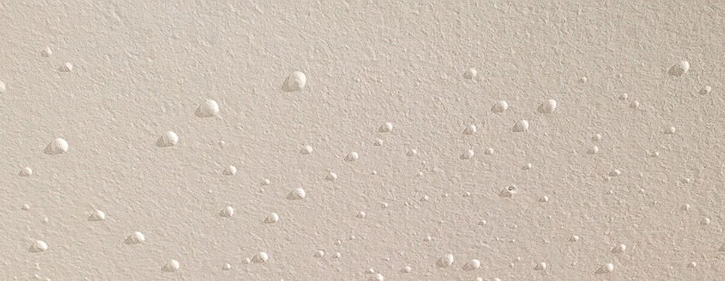
What causes pinholes?How to deal with it?
① Dust and foreign matter attached to the plate. When making the plate, some souls will be mixed during water washing and development. In addition, during the emulsion coating, dust will be mixed in, and pinholes will be formed when it is attached to the screen. These can be discovered and repaired in time if you pay attention to the inspection during the test. If Dust and foreign matter are attached to the screen, they will block the screen opening and cause pinholes. Before formal printing, carefully check the screen and remove the dirt on the plate.
② Washing the glass surface. The glass plate should be pre-treated before printing to clean its surface and then printed immediately. If the glass is not printed immediately after treatment, it will be contaminated again. After pre-treatment, dirt such as grease can be removed, and at the same time, Dust attached to the surface can also be removed.
③. Pay special attention to your hands when carrying the glass. Fingerprints will also adhere to the printing surface and form pinholes during printing.
② Washing the glass surface. The glass plate should be pre-treated before printing to clean its surface and then printed immediately. If the glass is not printed immediately after treatment, it will be contaminated again. After pre-treatment, dirt such as grease can be removed, and at the same time, Dust attached to the surface can also be removed.
③. Pay special attention to your hands when carrying the glass. Fingerprints will also adhere to the printing surface and form pinholes during printing.
Contact Us
Your feedback fuels our growth, and your questions drive our solutions.
We value your feedback, inquiries, and suggestions. Please feel free to get in touch with us
General inquiries
Please contact us via sales@bo-glass.com, and we will reply to you as soon as possible.
Interested to work with us
Drop your resume at info@bo-glass.com
and we will get back to you shortly.
We uses the contact information you provide to us to contact you about our relevent content, products, and services.